
Did you know there are over 27 million online stores in the world? That’s a big crowd. So, if you’re starting one, how do you make sure yours doesn’t get lost?
The answer lies in exceptional ecommerce website development. It’s all about building a site that doesn’t just look good, but works brilliantly. Think of it as fine-tuning the engine and the interior of a car. This kind of ecommerce web development makes every click smooth, every payment secure, and every visit enjoyable.
And the timing is perfect. The web development market is booming, meaning there are more tools and opportunities than ever to build something amazing. This growth means you can create a user-friendly website that solves real problems for store owners, like:
- Choosing the right features for your project.
- Picking the best ecommerce development framework.
- Adding a shop seamlessly to your existing site.
In short, a strong online store is essential for any modern business. That’s where platforms like BigCommerce come in, offering powerful solutions for e-commerce website development.
So, let’s get started. This guide will walk you through everything about e-commerce development, helping you build an online store that truly stands out.
What is ecommerce website development?
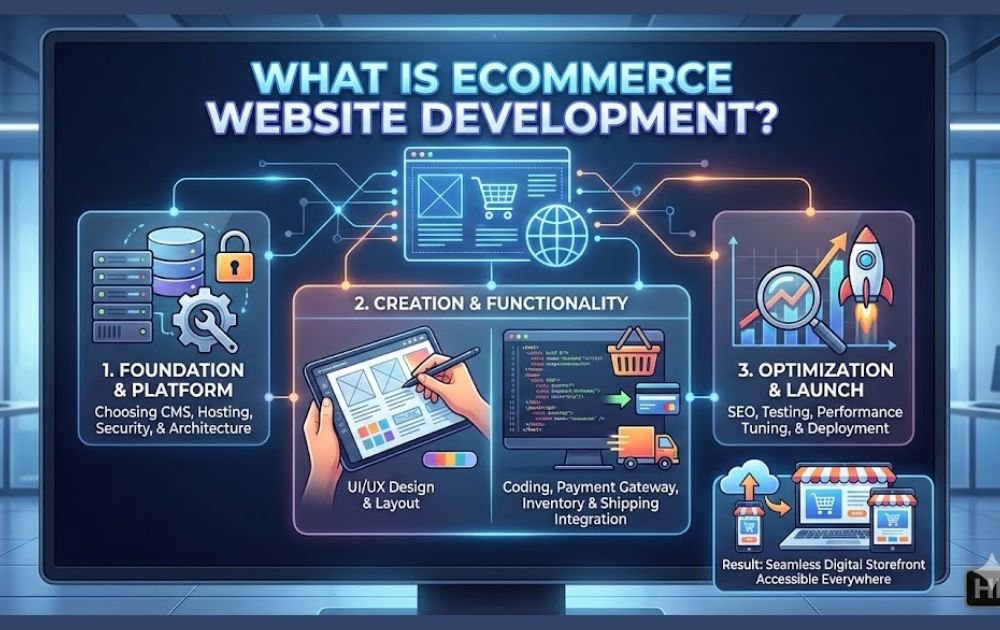
So, what exactly is ecommerce website development? In simple terms, it’s the technical process of building an online store from the ground up. But let’s break that down a bit.
First, think of your store having two main parts: the frontend and the backend.
- Frontend development is everything your customer sees and touches. It’s the beautiful design, the easy-to-use menus, the product photos, and the smooth checkout button. Essentially, it’s the shop window and the sales floor.
- Backend development is the hidden engine room. This is where all the data lives and where the magic happens, processing orders, managing inventory, and keeping customer information safe. It makes sure that when a customer clicks “buy,” the right product gets shipped to the right place.
But a store doesn’t operate in a vacuum. That’s where integrations come in, the third key piece. This means connecting your online shop to other essential tools, like payment systems (think PayPal or Stripe), shipping carriers (like FedEx or UPS), and marketing analytics. It’s like plugging your store into a power grid of services.
Now, ecommerce development isn’t standing still. It’s racing forward with exciting new trends. For example, headless commerce is gaining popularity. This approach separates the frontend design from the backend engine, giving businesses incredible flexibility to update their look or publish to apps and digital screens much faster.
Furthermore, AI-driven personalization is changing the game. Imagine a store that knows what you like and suggests products just for you. This smart technology tailors the shopping experience to each visitor, which builds stronger customer relationships and keeps people coming back.
Ultimately, smart ecommerce web development weaves all these pieces—frontend, backend, and smart integrations, together to create a seamless, powerful, and modern shopping experience. That’s the core goal of professional e-commerce development.
Options for building an ecommerce website
Choosing how to build your online store is one of your most important decisions. The right path will help your business grow smoothly, provide a great experience for shoppers, and keep costs under control.
When it comes to ecommerce web development, you generally have three main roads to take:
- Build from scratch using an open-source platform.
- Customize a ready-made SaaS (Software-as-a-Service) solution.
- Adopt the modern MACH (Microservices, API-first, Cloud-native, Headless) architecture.
Each option has its own strengths and trade-offs. So, let’s walk through them one by one. By understanding the benefits and challenges of each, you can pick the ecommerce development method that perfectly fits your business vision and goals. This informed choice is a critical first step in any successful e-commerce website development project.
Build it from scratch.
If you have a skilled tech team, an open-source platform offers maximum control for your ecommerce website development. You can customize everything.
But, your team must handle security, updates, hosting, and compliance alone — a growing challenge as you scale.
This path is best for large businesses with unique needs that require deep custom ecommerce development. While it gives unmatched flexibility in ecommerce web development, it demands serious ongoing investment in people and tech infrastructure.
Customize a SaaS solution.
Don’t have a big budget or a coding team? A SaaS platform like Wix is a user-friendly and affordable choice for ecommerce website development.
With SaaS, you pay a subscription to use a ready-made platform hosted in the cloud. The provider handles security, updates, hosting, and compliance for you. This means you can launch your store faster and with less upfront cost.
Some platforms, like BigCommerce, go even further as an “open SaaS” solution. You get the ease of SaaS—hosting, security, and lower costs—plus the flexibility to customize through open APIs. This makes ecommerce web development both quick and adaptable.
Tools like BigCommerce’s Catalyst headless storefront help you build unique shopping experiences without deep coding. It blends ready-to-use features with developer tools, perfect for businesses that want to scale affordably. This approach simplifies e-commerce development while keeping options open for growth.
MACH (microservices, API-first, cloud-native, and headless).
For years, most online stores were built as a single, locked system—where the frontend design and backend logic were fused together. This “monolithic” setup works fine for small stores with simple needs.
But as you grow—maybe launching multiple sites or selling in new countries—this old model can hold you back. It gets slow, rigid, and hard to update.
So, what’s the modern fix? MACH architecture.
MACH stands for Microservices, API-first, Cloud-native, and Headless. It’s a flexible way to build your tech stack by choosing the best tools for each job. Here’s what that means in plain terms:
- Microservices: Instead of one big software block, your store is built from small, independent services (like checkout, search, or payments). Each can be updated without breaking the others.
- API-first: Everything is designed to connect easily with other tools and systems via APIs. This makes ecommerce development more integrable and future-proof.
- Cloud-native: Your store runs fully in the cloud. This means better performance, automatic updates, and no physical servers to manage.
- Headless: This separates the frontend (what customers see) from the backend (how the store runs). You get total design freedom and can deliver shopping experiences anywhere—websites, apps, even smart screens.
Platforms like BigCommerce support this modern approach to ecommerce web development. They let you go headless easily, connecting your backend operations to any frontend you choose. This means you can innovate faster, without being stuck in an old, rigid system. In short, MACH makes e-commerce website development more agile, scalable, and ready for what’s next.
Choosing the right ecommerce website developer.
Picking the right developer is key for your online store’s success. A skilled pro doesn’t just build a site—they create smooth shopping journeys that turn visitors into loyal customers. Their know-how keeps your store running well, looking professional, and ready for tomorrow’s shoppers.
And this matters more than you might think. A recent survey found that 75% of shoppers will leave a site that looks outdated or unprofessional. On the flip side, 92% feel more confident buying from a site that works seamlessly.
So, how do you make sure your ecommerce web development is in good hands? Hire a team with real ecommerce experience. They’ll know the ins and outs of what makes an online store succeed.
Platforms like BigCommerce often have partner networks full of vetted experts. Tapping into these ecommerce website development services means working with professionals who know the latest trends and best practices. They can build a site that not only delights customers but also lifts your sales—making your investment in ecommerce development truly pay off.
Understand different developers’ strengths.
When building your online store, you’ll find that developers often specialize. Some are wizards at creating beautiful, user-friendly storefronts that capture your brand. Others are experts behind the scenes, building the technical engine that makes everything run smoothly.
It’s important to pick a developer whose strengths match your project’s needs. While some pros can handle both design and technical work, most have a main focus. Make sure their skills line up with your goals.
As you plan your project, keep these key elements in mind for your ecommerce website development checklist:
- Security & Compliance: PCI compliance and strong web security are non-negotiable.
- SEO: Built-in optimization to help customers find you.
- Flexible Payments: Support for multiple payment gateways and options.
- Easy Content Management: A CMS that lets you update your site without coding.
- Mobile-Friendly Design: A store that works perfectly on any device.
- Smart Shopping Cart: A smooth, clear checkout process.
- Product Filtering: Tools that help shoppers find what they need quickly.
Focusing on these areas during ecommerce web development will help you build a store that’s not only functional but also primed for growth and great customer experiences
Base your choice off your needs.
Before you hire a developer, get crystal clear on what your online store actually needs. What are your goals, and what skills will it take to reach them?
For example:
- If you’re using an open-source platform, you’ll definitely need a backend expert. But don’t forget the frontend — great design is just as important for winning customers. Look for a team strong in both areas of ecommerce development.
- If you’re on a SaaS platform, your focus might be more on frontend customization and branding. Still, having a developer who can work with APIs is valuable for adding custom features or complex integrations beyond the basics.
Once you know what you need, vet developers carefully. Review their past projects, check which technologies they specialize in, and make sure their experience matches your business goals. Doing this homework helps you find the right partner to turn your vision into a real, thriving store through solid ecommerce website development.
Functionality to consider when developing an ecommerce website
The features your online store needs depend entirely on your business model and goals. There’s no one-size-fits-all checklist.
Start by aligning your features with your customer’s journey. Ask yourself: What will make their experience smoother from browsing to buy?
For instance:
- A local boutique might not need multi-currency support.
- But an international brand will see it as essential.
A practical way to plan is to work from broad essentials to specific upgrades:
- List your must-haves – like your chosen payment gateways or key marketplace integrations.
- Add your business-specific needs – such as automatic tax calculations or real-time shipping rates.
- Rank the “nice-to-haves” – on a scale of 1 to 5. A “1” is a feature that directly boosts sales. A “5” is something that simply makes operations run smoother.
This step-by-step method ensures your ecommerce website development stays focused, efficient, and tailored to what really matters for your growth and your customers’ experience.
1. Mobile-Friendly (Responsive) Design
Nearly half of all online sales will happen on mobile devices by 2027. That’s why your store must look and work perfectly on phones and tablets. A responsive design—or even a dedicated mobile app—ensures a seamless experience for every shopper, no matter what device they use. Platforms like BigCommerce offer ready-made, mobile-optimized themes to help you launch quickly.
2. SEO (Search Engine Optimization)
SEO helps customers find you when they search online. By optimizing your content, URLs, and meta tags, you can attract visitors who are already looking for what you sell. BigCommerce includes built-in SEO tools to improve your visibility on Google and drive relevant, ready-to-buy traffic to your site.
3. Speed & Performance
Slow websites frustrate shoppers and hurt your search rankings. Site speed affects everything from SEO to sales. Choose a platform with strong hosting and performance features—like BigCommerce—to keep load times fast and your customers happy.
4. Easy Content Updates (CMS)
A Content Management System (CMS) lets you easily update blog posts, images, and other content without touching code. This helps keep your site fresh and engaging, supporting your products with useful, timely information.
5. Product & Inventory Management
Your store needs to help you manage products smoothly—adding new items, tracking inventory, and running promotions. Reliable product management tools ensure you never oversell and can always meet customer demand.
6. Smooth Payments & Checkout
Today’s shoppers expect multiple payment options—credit cards, PayPal, Apple Pay, Buy Now Pay Later, and more. A streamlined, secure checkout process reduces cart abandonment and can even increase order values. With BigCommerce, you can customize your checkout and enable one-click payments.
7. Security & Trust
Handling customer data requires serious security. PCI compliance is a must for accepting payments, and platforms like BigCommerce provide enterprise-level security built-in, including SSL certificates and fraud protection—so you can focus on your business, not on security headaches.
8. Integrations & Connectivity
Your ecommerce platform should connect easily with other tools you use: email marketing, CRM, ERP, shipping carriers, marketplaces, and social media. These integrations streamline your operations and create a unified customer experience.
9. Marketing-Ready Features
Think about marketing from the start. Features like social sharing, email sign-ups, review sections, and discount codes should be part of your site’s foundation. A clear domain name and consistent branding across channels also help build recognition and trust.
6 steps for developing a custom ecommerce website
You don’t need to start from scratch. Modern platforms make ecommerce website development faster and easier than ever—even without deep tech skills. But before you dive in, follow this clear path to build a store that’s set up for success.
1. Define Your Business Goals
Start with the “why.” Why are you moving online?
- Is it for direct-to-consumer sales?
- To support a physical store?
- To expand from B2C to B2B (or vice versa)?
Then, think in numbers:
- How many products will you launch with?
- Will you sell locally or go international?
- What’s your target weekly sales volume?
- How will you measure growth?
Clarity here shapes every decision that follows in your ecommerce development process.
2. Design the Shopping Experience
Imagine the journey your customers will take.
Do they want fast and simple (like buying everyday items) or immersive and exploratory (like browsing a boutique)?
Key features to consider:
- Product filters (by size, color, price)
- Side-by-side product comparison
- One-page checkout
- Promotions & discounts
This step ensures your store’s flow matches how your customers actually shop.
3. Choose Your Platform
Compare the top platforms based on your needs. Popular choices include:
- BigCommerce
- Shopify / Shopify Plus
- Magento
- WooCommerce + WordPress
If content is key (like a blog alongside your shop), choose a platform that blends content and commerce smoothly—many, like BigCommerce, integrate seamlessly with WordPress.
4. Add Your Products
Your platform should make it easy to upload, edit, and sync inventory across sales channels. Focus on:
- High-quality images that build trust
- Detailed descriptions with specs, sizes, and features
Good product presentation reduces returns and boosts confidence.
5. Configure Payments & Shipping
Offer multiple payment options—today’s shoppers expect choices like credit cards, PayPal, Apple Pay, and Buy Now, Pay Later (BNPL). If selling internationally, choose gateways that support your target regions.
BigCommerce, for example, offers flexible integrations so you can tailor checkout and shipping to your business model.
6. Test & Launch
Before going live, run through this checklist:
- Test checkout and payments
- Check all links and forms
- Review mobile and desktop views
- Verify tax and shipping settings
- Test promo codes and discounts
- Ensure images are optimized for speed
- Confirm inventory is accurate
A smooth launch depends on careful quality assurance (QA). Take the time to test—it pays off in customer trust and fewer issues post-launch.
How BigCommerce simplifies ecommerce development
BigCommerce strikes the perfect balance: it gives you powerful ready-to-use features and the freedom to customize. This “open SaaS” approach simplifies the entire process of ecommerce development, helping you build a store that’s both professional and unique.
Here’s a closer look at how the platform supports your growth at every stage:
🔧 1. Flexible Customization with APIs
Even though BigCommerce is packed with built-in features, you’re not locked in. Its powerful APIs let you connect custom tools—like special shipping calculators or local payment methods—to fit your exact business needs. This makes ecommerce web development adaptable and future-proof.
🛡️ 2. Built-In Security & Easy Scalability
Security is handled for you. BigCommerce is Level 1 PCI compliant and includes advanced fraud protection, so you can accept payments safely. And as you grow, the platform scales with you—handling more traffic, products, and sales without slowing down.
🔍 3. SEO & Mobile Optimization
Ranking on Google is easier with built-in SEO tools. You can customize URLs, page titles, and meta descriptions, and the platform auto-generates sitemaps. Plus, all themes are mobile-optimized, which is essential since nearly half of all online sales will come from mobile devices by 2027.
⚡ 4. Fast, Reliable Performance
Slow sites lose sales. BigCommerce uses a global CDN and high-performance hosting to ensure your store loads quickly—on any device. High uptime means your store is always open, building trust and reducing cart abandonment.
🔗 5. Easy Integrations
Connect your store to the tools you already use: CRMs (like Salesforce), ERPs, email marketing platforms, accounting software, and marketplaces. These integrations streamline your operations and help you deliver a smoother customer experience.
🚀 You’re Ready to Launch
Building an online store is a big step, but you don’t have to do it alone. With the right platform—and a clear plan—you can create a store that looks great, works smoothly, and grows with your vision.
And if you ever need guidance, BigCommerce offers expert support and a partner network to help at every stage of your e-commerce website development journey.
FAQs about ecommerce website development
1. How can I choose the right platform for my ecommerce website?
Start by looking at your budget, technical skill level, and long-term goals. If you want ease and speed, a SaaS platform like BigCommerce or Shopify is great. If you need deep customization and have a development team, consider open-source options like Magento. For flexibility without heavy maintenance, “open SaaS” platforms offer a balanced approach.
2. What are the must-have features for an ecommerce website in 2026?
Focus on:
- Mobile-first design (nearly half of sales are on mobile)
- Fast loading speed
- SEO-friendly structure
- Multiple payment options (including BNPL and digital wallets)
- Strong security (PCI compliance, SSL)
- Easy product management & inventory sync
- Integration capabilities with CRM, ERP, and marketing tools
3. What is the role of an ecommerce website developer?
A developer brings your online store to life. They handle the technical build, ensure smooth functionality, customize features, integrate tools, optimize performance, and keep your site secure. They’re essential for turning your vision into a fully working store.
4. Do I need a frontend developer and a backend developer?
It depends on your project. If you’re using a SaaS platform, you might only need a frontend developer to customize the look and feel. For custom or open-source builds, you’ll likely need both:
- Frontend developer: Works on design, user interface, and customer experience.
- Backend developer: Manages servers, databases, payments, and integrations.
5. How do I determine what features my ecommerce website needs?
Map them to your customer’s journey. Start with essentials like payment gateways and mobile design, then add business-specific tools (like tax automation or multi-currency support). Prioritize features that drive sales first, then add efficiency tools later.
6. How long does it typically take to develop an ecommerce website?
Timeline varies based on complexity:
- Simple store (using a template): 2–6 weeks
- Customized mid-size store: 1–4 months
- Large, custom-built store with complex features: 4+ months
Using a platform with pre-built features can significantly speed up the process.
7. How can I ensure my ecommerce website is secure?
- Choose a platform with built-in PCI compliance and SSL.
- Keep software and plugins updated.
- Use strong passwords and enable two-factor authentication.
- Regularly back up your site data.
- Consider adding fraud detection tools.
8. How do I integrate payment gateways into my ecommerce website?
Most platforms offer built-in connections to popular gateways like Stripe, PayPal, and Square. You usually:
- Select the gateway in your platform’s payment settings.
- Enter your API keys (provided by the gateway).
- Test transactions in sandbox mode before going live.
For custom or regional gateways, a developer can help with API integration.